Showing posts with label Android Apps. Show all posts

Talon for Twitter v3.2.1 apk

Talon for Twitter v3.2.1 apk
Requirements: 4.0 and up
Overview: Get fully immersed in your Twitter with this beautiful, feature PACKED Twitter client with a design that actually makes sense!
Get fully immersed in your Twitter with this beautiful, feature PACKED Twitter client with a design that actually makes sense!

Created with Android 4.4 (KitKat) in mind. Includes full screen (translucent) layouts, stunning animations and more! Of course that doesn't mean earlier versions of android get left out! The only thing that wasn't able to be recreated in Android 4.3 and below was the transparent navigation and status bars... Sorry! It just isn't possible

Beautiful, up-to-date layouts, designs, and neat animations isn't the only thing Talon has going for it though! The list of features is enormous as well, doing everything you could ever want from a Twitter app right off the bat. Even though it is new, I have added every single major and minor Twitter feature that I think is absolutely essential plus a ton that most people wouldn't even think of. Here is a pretty comprehensive list of its features:

Twitter features:
- Live streaming support
- Support for 2 accounts
- View your timelines (main, mentions, direct messages, links, and pictures)
- Favorite users
- Update your profile picture, banner, location, and user description
- block, follow, and add users to lists
- Attach locations to your tweets
- And the list goes on

Customization features:
- Extremely powerful developer theme engine (https://github.com/klinker24/talon_theme)
- Choose between either "Talon" or "Hangouts" layouts
- Choose from 3 beautiful base themes (light, dark, and pitch black)
- Custom text sizes
- Night mode
- Auto-Refresh options
- Custom notification settings
- And many other goodies in there as well!

App Features:
- "Talon Pull" to be always listening for tweets/interactions
- Expandable, actionable, and dynamic notification system
- Full app popup
- Full emoji support
- View in-line Twitter and Instagram pictures
- View in-line YouTube thumbnails
- Native YouTube player
- In-app browser
- Complete landscape and tablet modes
- Advance to new pages in a "windowed" viewing mode
- Never leave your timeline with in-line replies, favorites, and retweets
- Hiding action bar
- "Do not disturb" mode
- Widget for main timeline
- DashClock Extension
- Google style pull to refresh for quick refreshing

You will never go back to your old Twitter client again!

Enjoy Talon and don't hesitate to contact me with questions, requests, or bugs! The best way would be either through email or get involved on the Google+ page.

Thanks!

Contact me (Luke Klinker):
Email: support@klinkerapps.com
My Twitter: @lukeklinker
Talon's Twitter: @TalonAndroid
Google+ Beta Page: http://goo.gl/KCXlZk
XDA Developers Thread: http://forum.xda-developers.com/showthread.php?t=2608962

Here are two different emoji plugins for you to choose from, choose whichever suits you best, install it and never worry about it again!
Android: https://play.google.com/store/apps/deta ... oard_trial
iOS 7: https://play.google.com/store/apps/deta ... _trial_ios

Permissions Explained:
- Write to Storage: Saves pictures to your SD card and writes them into the cache.
- Read from Storage: Used when backing up settings.
- Location: Used for trends and attaching locations to tweets.
- Network Communication: Obviously have to be able to interact with Twitter
- Network State: Used so the user can toggle background sync to only over WiFi.
- Run at Startup: Re-schedules the background refreshes.
- Keep Awake: Used for background refreshes and waking the screen.
- Vibrate: Used for the notifications.

Credit:
- Jacob Klinker: to many things to list! Tons of ideas, support, and inspiration
- Aaron Klinker: Icon Design
- JRW: Naming
- Other open-source libraries and resources used can be found under the 'Get Help' section in settings.

What's New
[3.2.0]
- View your timeline on your Android Wear device
- Long click links, user handles, and hashtags for more options
- Notification when rate limits are reached on the home timeline
- Shows whether you follow the user or not when viewing your own followers list
- Much better FAQ section and "Help/Feedback" option added to the overflow menu
- Workaround for Twitter's webpage going missing when logging into your second account
- Some reported bug fixes

This app has no advertisements

Talon for Twitter v3.2.1 apk


Navier HUD Navigation Premium v2.2.20 apk

Navier HUD Navigation Premium v2.2.20 apk
Requirements: Varies with device
Overview: Relative links about Navier HUD
How to Turn Your Nexus 7 Tablet into a Futuristic Heads-Up Display (HUD) for Your Car
http://goo.gl/rXzC1V
- Top 5 Automotive Android Apps
http://www.thegeekscafe.com/tips-tricks ... -apps.html
Navier HUD for Windows Phone is coming! 
http://www.windowsphone.com/zh-tw/store ... d1df33f28c
------------------------------------
What's difference in Premium version:
1. No ads
2. Syncs your data on different devices

**Please make sure that your device works well with free version before you buying it **
NOTE: Needs 3G connection when navigation
NAVIER HUD – New navigation concept
Navier HUD is an application available on Android phones. Navier HUD uses the HUD (Head-up display) concept to help drivers without having to take their eyes off the road. The driving information are projected on to the windshield when using Navier HUD while the phone lie down in front of the windshield. Navier HUD has a simple navigation function to hint people toward a selected destination just follow the routing instruction. For the use of HUD, driving information and instruction are designed as simple symbols to help drivers easy to recognize.

[Safer driving]
Navier HUD (head-up display) projects navigational instructions on the windshield, effectively providing essential information to the driver without having to take your eyes off the road.
[Turn-by-turn navigation]
The navigational instructions are designed to be read clearly in HUD mode. Simple instructions and signals is the main goal here. Turn-by-turn speech instructions are supported (not all languages).
[Usable for different vehicles]
Navier HUD can be used for driving, biking, jogging... You can switch between HUD and normal mode for regular use on a phone holder.
[Customize your layout]
Navier HUD lets you create your own panel layout with parts like a compass, routing instructions, average speed, route progress, distance travelled. Just choose the parts you need and arrange them however you like.
[Synchronize data with your Google account]
Navier HUD synchronizes and backs up your data (destination and panel layouts) to multiple devices using your Google account.

What's New
- fix route planning issue

This app has NO advertisements

Navier HUD Navigation Premium v2.2.20 apk


Sleep as Android FULL v20141005 build 906 apk

Sleep as Android FULL v20141005 build 906 apk
Requirements: Varies with device
Overview: Track your sleep and wake up gently with nature sounds in optimal sleep phase
Alarm clock with sleep cycle tracker.
Description 
Smart alarm clock with sleep cycle tracking. Wakes you gently in optimal moment for pleasant mornings.

Features:
- NEW! Philips HUE smartlight integration
- NEW! Pebble smart watch wrist-tracking
- Sleep cycle tracking with smart wake up (2 weeks trial)
- Sleep graph history
- Sleep deficit, deep sleep and snoring statistics
- Social sharing (FaceBook, Twitter)
- Gentle volume nature sound alarms (birds, sea, storm...)
- Alarm music playlists
- Nature sound lullabies with binaural tones for fast fall asleep
- Never oversleep again with CAPTCHA wake up verification (Math, Sheep counting, Phone shaking, Bathroom QR code or NFC tag)
- Sleep talk recording, snoring detection and anti-snoring
More features waiting for you to explore!

Keywords: alarm, alarm clock, sleep, snoring, tracking, lullaby, actigraphy, wake up, smart watch, Pebble, binaural beats

Permissions explained
https://sites.google.com/site/sleepasandroid/doc/permissions

Quick start
https://sites.google.com/site/sleepasandroid/how-it-works

Documentation
https://sites.google.com/site/sleepasandroid/doc

FAQ
https://sites.google.com/site/sleepasandroid/q-a-faq

More information
_https://sites.google.com/site/sleepasandroid/

What's New
We are constantly improving this app with releases several times a month bringing timely fixes and new feature you asked for
Detailed release notes at:
https://sites.google.com/site/sleepasandroid/release-notes
20141005
-More Material-like design elements, less contrast colors
-Settings revamp - clear look, icons, sections, structure
-Feature suggestion forum available from the menu, please submit your ideas and vote up
-Android Wear reduced battery use tracking - 15% consumption per night on Gear Live
-Fix for pausing on Wear devices
-Experimental battery optimized sleep tracking also for your phone <b>settings > sleep tracking > battery optimized</b>
-Only for supported devices e.g. Nexus 5, Sony Xperia Z1...minimum Android 4.4+
-Does not work with noise recording or snoring detection
-Just 6% battery consumption on Nexus 5 per night of tracking
-Play all at noises respects filtering by tags or comments
-Fix for sleep length advice when minutes are up
-Others stats are no collapsible under the tag category
-Fixes in country detection for Others statistics
-Getting rid of confusing switch when skipping nex alarm, instead using a red Dimiss button
-Alarm range in sleep tracking is clickable to change next alarm settings
-One-touch sleep tracking with alarm scheduled through the menu drawer option - ideal sleep or 3 last used nap options
-Implicit CAPTCHA alarm suppress time has been reduced from 2 minutes to 1 minute
-Next alarm day indicator
-Fix for disappearance of weather and #fullmoon and #newmoon tags
-Fix for exporting/importing commas and line breaks in comments
-Fix for starring noises when adding tags from playback - noises may be un-starred
-Fix for wrong sleep duration when returning to rating activity after a while
-Fix for duplicate weather tags on rating screen
-Automatic airplane mode (removed in Android 4.2+) will at least automatically disable Wifi
-Saving noise edits when using X to close current noise playback
-Fix for refreshing the tags tab in charts when changing filter criteria
-Dream diary captcha texts get copied to clipboard when no active sleep record exists
-Fix for crash in widgets during app reinstall
-Fix problem with wrong time in graph axis during tracking
-Use application settings captcha when adding alarms automatically
-New texts in Chinese, Portuguese, German, Dutch, Slovak and Czech (many thanks guys)

This app has no advertisements

Sleep as Android FULL v20141005 build 906 apk


Flair - Icon Pack (Beta) v1.1.2 apk

Flair - Icon Pack (Beta) v1.1.2 apk
Requirements: 4.0.3+
Overview: A beautiful selection of icons bringing a stock-like feel, with a whole new dimension in visuals and minimalism.
Icon Pack Features:

○ 400+ icons rendered at HD Resolution 192x192px
○ 55 beautiful, matching HD wallpapers which are Cloud based. Can also save to your device!
○ Icon Masking will theme all your unthemed icons
○ Full MUZEI Live Wallpaper Support
○ Categorised Icon Picker in Nova Launcher
○ Unique and Sleek Dashboard App to view Wallpapers, Icons and to contact me
○ Icon Preview Function within Dashboard to view all included icons
○ Automatic Icon Request Tool
○ Dynamic Calendar Support 
○ Link to Instinct - Zooper Widgets inside Dashboard

Launchers Supported:
○ Apex
○ Nova
○ Holo
○ ADW / EX
○ Action (Pro)
○ GO Launcher EX (Switch off 'icon mask' in the Preferences)
○ Smart
○ Aviate
○ Next 
○ Nine 
○ Atom
○ Inspire 
○ KK
○ Lucid / Lucid Pro
○ Solo
○ TSF Shell
○ Most other Launchers, including TouchWiz and Sense, will work with the 'Unicon' or 'Beautiful Icon Styler' app

v1.1.2
Public Release!
Still in beta however, not everything is finalized.
Now 400+ Icons.
Wallpapers still aren't final.
Feel free to request icons, but it will take longer for me to get through them all.

This app has no advertisements

Flair - Icon Pack (Beta) v1.1.2 apk


Elun - Icon Pack v2.5.0 apk

Elun - Icon Pack v2.5.0 apk
Requirements: 4.0.3 and up/Lucky Patcher
Overview: WELCOME TO ELUN. CLEAN AND SIMPLE, WITHOUT ANY SHADOWS OR EFFECTS. PURE FLAT AND CIRCLE ICON PACK WITH STOCK COLORS. SIMPLICITY!
★ 2.000+ HD icons (192x192) ready for future devices
★ 31 HD wallpapers cloud based. You can save them on your device!
★ Icon masking will theme all your unthemed icons
★ Launchers support: Action, ADWEX, Apex, Atom, Aviate, GO, Inspire, Nova, Smart, Solo, TSF, KK Launcher and many more!
★ Works with every launcher using unicon
★ Full MUZEI live wallpaper support
★ Dynamic calendar icon support
★ Minimalistic analog clock widget
★ Many alternative icons to chose
★ Icons sorted in several categories with search and preview feature
★ Help section for starters
★ Regular weekly updates
★ App design in very modern and minimal flat style

If you like the icons, please rate them

Please, if you have any issues with the app, send me an email before writing a negative review. I would help you immediately

android.permission.INTERNET is needed for wallpapers, since they are cloud based. This is done in order to reduce app size!

FOR GO LAUNCHER USERS
Currently GO LAUNCHER does not support icon masking, so go to preferences > Icons > TICK OFF "show icon base"

FOR TSF LAUNCHER USERS
Currently TSF LAUNCHER does not support icon masking!!! 

You can also apply icons from launcher settings, if that launcher do not have apply button inside the app (for example ATOM)

Follow latest updates,new projects and get more wallpapers on social networks
Google + - https://plus.google.com/u/0/103259272253179703637
Twitter - https://twitter.com/Vertumus_XDA
Facebook - https://www.facebook.com/viktor.vucinic

SUPPORT
You do not see your desired icons in the pack?
Please send me your icons requests trough icon request feature in the app
If you notice any bugs or you have any suggestions, feel free to contact me anytime and ill will help as soon as possible!

Thank you all for the support!

What's New 
<b>v2.5.0 - 04.10.2014.</b>
- added 25+ new icons for this week
- fixed many icons not applying
- several revised icons
- bug fixes
Thank you all for the support!

This app has no advertisements

Elun - Icon Pack v2.5.0 apk


Rifon - Icon Pack v2.9.0 apk

Rifon - Icon Pack v2.9.0 apk
Requirements: 4.0.3 and up
Overview: RIFON IS SIMPLE AND SQUARE ICON PACK. DESIGNED TO BE FLAT AND EASILY RECOGNIZED.
RIFON IS SIMPLE AND SQUARE ICON PACK. DESIGNED TO BE FLAT AND EASILY RECOGNIZED. VERY HIGH LEVEL OF DETAILS AND CRISP GRAPHICS!
Icons look incredibly crisp, with high definition details on both phone and tablets!
★ 2.350+ HD icons (192x192) ready for future devices
★ 30 HD wallpapers cloud based. You can save them on your device!
★ Icon masking will theme all your unthemed icons
★ Launchers support: Action, ADWEX, Apex, Atom, Aviate, GO, Inspire, Nova, Smart, Solo, TSF, KK Launcher and many more!
★ Works with every launcher using unicon
★ Full MUZEI live wallpaper support
★ Dynamic calendar icon support
★ Minimalistic analog clock widget
★ Many alternative icons to chose
★ Icons sorted in several categories with search and preview feature
★ Help section for starters
★ Regular weekly updates
★ App design in very modern and minimal flat style
If you like the icons, please rate them
Please, if you have any issues with the app, send me an email before writing a negative review. I would help you immediately
android.permission.INTERNET is needed for wallpapers, since they are cloud based. This is done in order to reduce app size!
FOR GO LAUNCHER USERS
Currently GO LAUNCHER does not support icon masking, so go to preferences > Icons > TICK OFF "show icon base"
FOR TSF LAUNCHER USERS
Currently TSF LAUNCHER does not support icon masking!!!
FOR CM THEME ENGINE USERS
If app disappear from the list, its CM bug and do this: go to settings of your device > apps > Rifon > delete cache and data > uninstall Rifon > go back to Play Store and install it again
You can also apply icons from launcher settings, if that launcher do not have apply button inside the app (for example ATOM)

What's New
REGULAR WEEKLY UPDATE IS HERE!!! ADDED 25+ NEW ICONS ALL FROM USERS REQUESTS!
REACHED 2.450+ ICONS!!! 31 HD Wallpapers in total
v2.9.0 - 04.10.2014.
- added 25+ new icons for this week
- fixed many icons not applying
- several revised icons
- bug fixes
Thank you all for the support!

This app has no advertisements

Rifon - Icon Pack v2.9.0 apk


Real Xperia Z3 CM11 Theme v1.0 apk

Real Xperia Z3 CM11 Theme v1.0 apk
Requirements: Varies with device
Overview: Important Note: Only for use with Theme Chooser / Theme Engine. A custom rooted ROM with Theme Engine / Chooser is required to run this application. If you do not understand these terms, this application is not for you.
Users with 1GB or less RAM/Memory, DO NOT apply the boot animation - It could result in a bootloop!
Users with HDPI screens or less, DO NOT apply wallpapers - It could cause some lags!
========================

This the most similar CyanogenMod 11 theme to Official Sony's design! 

What's Included/Themed?
• Framework
• Dialer
• Messages
• System UI
• Lockscreen
• Settings
• Fonts
• Wallpaper
• Loading Spinners
• Launcher
• Boot Animations
• Stock Icons
• Ringtones/Alarms/Notifications
• And much more!

This app has no advertisements

Real Xperia Z3 CM11 Theme v1.0 apk


SportsTracker PRO v4.6 apk

SportsTracker PRO v4.6 apk
Requirements: Android OS 1.5 +
Overview: Share, compare, train and compete in your sport on http://sportstracklive.com
Beat your personal bests!

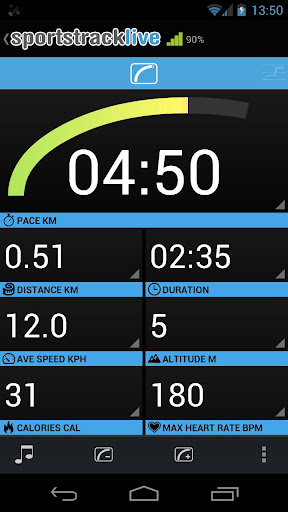
Superior GPS sports tracking app. Running, cycling, mountain biking, skiing, snowboarding, sailing, biking, flying, gliding. The best featured app to record your GPS track and monitor your performance and cardio fitness.

• Speed, distance, time, pace, altitude gain/loss
• Training plans
• Heart rate*
• Breathing rate***
• Skin temperature***
• Cadence**
• Voice trainer feedback
• Live tracking
• Personal Bests
• Performance
• Auto facebook/twitter
• Groups
• Friends
• Replay my tracks on Google maps
• Realtime zoomable charts
• Weather
• Calories
• Export in GPX, CSV, KML from the website

Upload tracks from Garmin, Polar, Timex and any other GPS at http://sportstracklive.com
* Bluetooth HRM required
** Zephyr Hxm required
*** Zephyr BioHarness required

Compatible with Zephyr Hxm (cadence, heart rate), BioHarness (heart rate, breathing rate and skin temperature)

What's New
V4.6 Heart rate readings from Android wear now enabled. New start up screen. Scroll top row to start the different work out modes. Sync with the center button. Scroll the bottom row for your history. Training plan settings moved to the navigation draw (drag screen from left edge or press the sportstracklive logo).
More info http://blog.sportstracklive.com

This app has no advertisements

SportsTracker PRO v4.6 apk


Vidstitch Pro - Video Collage v1.6.3 apk

Vidstitch Pro - Video Collage v1.6.3 apk
Requirements: 4.1 and up
Overview: #Vidstitch - Now on Android!
■ Featured on 148apps, Stelapps, and many more!
#Vidstitch seamlessly combines your videos and photos to share your collage on Instagram. It's easy!
We engineered this app from the ground up to be an intuitive and effortless experience for you. #Vidstitch is intelligent and automagically optimizes for Instagram. Just choose your videos and photos and let #Vidstitch handle everything in the background.

≈ Less is More ≈
◎ Simple and intuitive user interface
◎ Choose your frame
◎ Combine your videos and photos
◎ Share your #Vidstitch on Instagram, Facebook, or Twitter

≈ Features ≈
◉ Combine videos and pics
◉ Multiple frames to choose from
◉ Edit your video or pic
◉ Play preview before saving
◉ Post to Facebook, Twitter, and Instagram
◉ Simple and Intuitive UI
◉ Optimized for Android
◉ Add multiple video clips
◉ Add your own soundtrack

≈ Issues in Current Version of Vidstitch ≈
To our valued users, we have realized that several issues have been reported on certain devices with the current version of Vidstitch Pro:
- Watermark on videos
- Video rendering issues
- Issues with uploading to social networking sites
We are working hard to fix these problems and improve overall stability, and will roll out an update as soon as we can! Additionally, we are also planning on implementing the following features, as seen in our iOS version:
- Sequential video for multiple videos
- Video cropping
- More music options

★★★★★ - Reviews

"Collage tools might be nothing new to the App Store, but an app that allows users to mix videos and still images together, all optimized for Instagram usage? Now that’s pretty handy, and it’s precisely what Vidstitch Pro offers." - 148apps

"Love this App! It's like PicPlayPost, but it's free! I combine the frames with Flipagram." - geraldinedjung

"Better than picplaypost. Finally a video collage app on Android. Thank youuu!" - SxiMxi

"This app goes perfect with Instasize and Flipagram! It's like Picframe, but with videos and music." - waynejcannella

Fresh Squeezed Apps is dedicated to bringing you clean, quality apps that are easy and convenient to use! If you ever have any comments or suggestions, contact us at contactus@freshsqueezedapps.com or connect with us on Facebook or Twitter!

This app has no advertisements

Vidstitch Pro - Video Collage v1.6.3 apk


FACEinHOLE® v3.8.0 apk

FACEinHOLE® v3.8.0 apk
Requirements: Android 1.6+
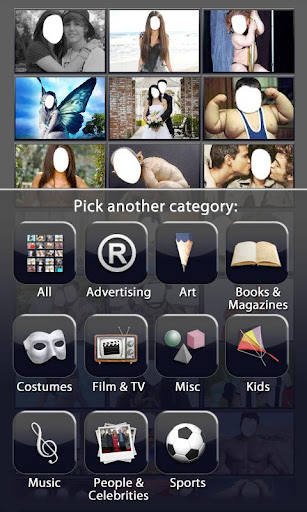
Overview: Haven't you ever wanted to see what you'd look like as a movie star, a supermodel or a rock band member? Well now you can with FACEinHOLE super realistic results. Amaze your family and friends!
After the iPhone success FACEinHOLE finally arrives on the Android market!
Haven't you ever wanted to see what you'd look like as a movie star, a supermodel or a rock band member? Well now you can with FACEinHOLE super realistic results. Amaze your family and friends!

With this app you'll:
- access over 120.000 public scenarios!!
- Never be fed up as new scenarios are added every day
- Put multiple persons in a scenario
- Have instant results
- Be able to adjust hue, saturation, brightness and contrast to make ultra realistic pictures
- Connect to Facebook to get images from your friends and post to your wall

Internet connection required (Wi-Fi/3G)

"FACEinHOLE is one of my all time favorites" Elizabeth Stowasky Fox News

"Here's a site that is capitalizing on something that probably everybody has tried to do at some time if they've been near a computer"
Ian Hughes, Yahoo.com - Cool Site of the Site

"It will look like you spent some time using Photoshop when in reality, you just spent a minute or two uploading your photo to the service and making a few minor adjustments"
Ashley Wagner, CybernetNews.com

"I think you'll have a lot of fun playing around with this. I sure did!"
The Kim Komando Show

What's New
- Bug Fixes
- New Share Button
- Fixed Search

This app has no advertisements

FACEinHOLE® v3.8.0 apk


RomeoLive v2.16 apk

RomeoLive v2.16 apk
Requirements: 2.1 and up
Overview: It's just that simple: THIS is the app to get online with PlanetRomeo, one of the leading gay communities.
It's just that simple: THIS is the app to get online with PlanetRomeo, one of the leading gay communities. 
YOU NEED AN EXISTING PLANETROMEO ACCOUNT TO LOG IN! WITH THIS VERSION YOU CAN BUY HERE AT GOOGLE, ESCORT FUNCTIONS ARE FULLY DISABLED due to restrictions of Google. 
If you find any bug or problem or have feature request, contact the developer first or use the club romeolive4android. A bad rating won't help getting something fixed. 
Features: 
- Supports large split screens on tablets 
- Own message database, not deleting the messages after a couple of days 
- RADAR locations and search (if location has RADAR enabled) 
- Checks for new messages/chat and new online favorite users in background. 
- Notification with/without vibration, using your GayRomeo sound or Android defaults 
- Supports Push (Offline-Notification) for messages and taps 
- Profile views: details, save/block, give tap, show/write guestbook, check friends & picture gallery, zoom & save pictures in gallery, check advertisements 
- Supported profile view types: user, club, guide 
- Read and write and administration in club forum 
- Supports all searches by name, id, location, create and administration of complex (saved) searches 
- Administration of own guestbook 
- Administration of own saved profiles 
- Administration of own picture gallery, folders, upload of pictures 
- and more...

This app has no advertisements

RomeoLive v2.16 apk


tinyCam Monitor PRO for IP Cam v5.6.5 apk

tinyCam Monitor PRO for IP Cam v5.6.5 apk
Requirements: Android 1.6 and up
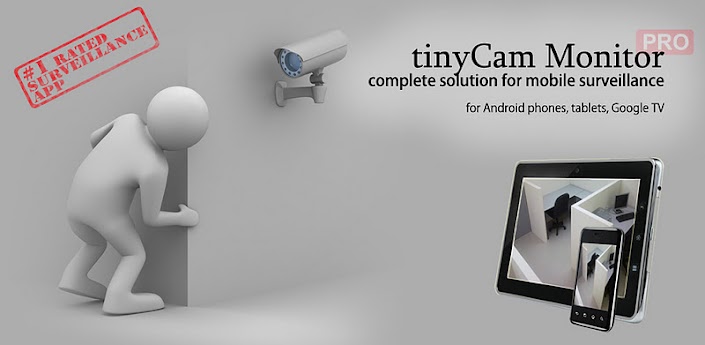
Overview: Mobile surveillance from any IP cameras for Android phones, tablets, Google TV.
One of the best app available for Android for remote surveillance, control and video recording for your private/public network or IP cameras, video encoders and DVRs with CCTV cams (#1 rated surveillance app, 4.6 average rating with 10,000+ active users). 

Monitor your baby, pet, home, business, traffic, and weather remotely and securely (no data being sent to 3rd parties). tinyCam Monitor provides best value to customers. Buy now to get more features in future updates for free! More than 25 major updates per year with new features!

Listed as a featured app on Google TV in Android Market. View your security cams right from the sofa!

Features:
Very intuitive custom made interface. See the screenshots to appreciate the quality of the app.
Support for M-JPEG based devices of all major vendors (100+)
1-way audio (listening) for D-Link, Edimax, Gadspot, SONY, Sharx Security, LogiLink, TRENDnet, Y-cam (selective models)
2-way audio (talking and listening) for Axis, FOSCAM, Loftek, Tenvis, Wansview, INSTAR, and more on the way!
SSL support (https) for secured monitoring and encrypting credentials
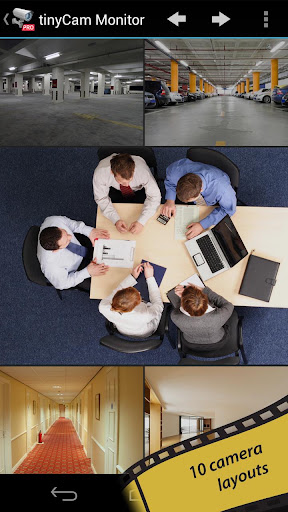
10 different layouts with unlimited number of cameras support
Control pan-tilt-zoom (PTZ) enabled devices, i.e. Panasonic, Pixord, Vivotek
Relay, LED control for some models
Cyclic 24/7 video recording (sequence of JPEG images) on SD card. Video playback is under development.
Easy to use pinch to zoom for digital zooming and swipes for camera selection
Sequence mode for automatic cameras switching
Import/export settings to SD card or Dropbox service
Support for any USB/laptop cams through 3d party software for PC/Mac (see FAQ)
Native interface for Honeycomb tablets and Google TV
Very CPU efficient
Still not amazed? How about these UNIQUE Features :
The only app in the market which supports ON CAMERA MOTION DETECTION (selective models). Make automatic snapshots or play alert sound on motion!
LAN SCANNER for automatic cams detection. Have a camera IP address suddenly changed? It takes only couple minutes to fully rescan your home network
Audio real-time processing (SQUELCH) for using it as a baby monitor

What's New
5.6.5
- ONVIF Profile S support (video/audio)
- LED On/Off via Android Wear. Swipe up to select.
- More http://goo.gl/B10FOY

This app has no advertisements

tinyCam Monitor PRO for IP Cam v5.6.5 apk


Tweetings for Twitter v6.4.3.1 apk

Tweetings for Twitter v6.4.3.1 apk
Requirements: 4.0.3 and up
Overview: Tweetings is a powerful Twitter Client for Android devices.
Tweetings is a powerful Twitter Client for Android devices. - True Push Notifications! Runs over 3G or WiFi for mentions, dms, when you get a new follower, when you are retweeted, etc. You don't even need the app open! We don't keep connections open to Twitter on your device, our push servers do all the hard work
- Large screen support with panes
- Supports posting to TwitLonger and inline expansion
- Uploading pic.twitter.com images as well as Img.ly, TwitPic and yFrog
- Can be configured to automatically resend failed tweets
- TweetMarker & Tweetings Cloud Timeline Sync support
- Stream Tweets over WiFi... let the tweets flow, no need to refresh your main timelines again
- Manage multiple accounts
- Split long tweets into multiple shorter tweets
- Inline image previews
- Light and dark theme, even automatically switch based on the time of day!
- Navigate timeline using volume keys (optional)
- User photo timelines
- Choose standard or light fonts (JellyBean and higher)
- Schedule tweets: write a tweet, set a time and a date and then just wait. Configure for your device to send them on your behalf or remotely where your device doesn't even need to be turned on!
- Saved Searches
- View tweeting user's nearby on a map
- Local Trends
- Translate tweets
- Shorten links with a variety of providers, including bit.ly, twtn.gs and goo.gl
- List support
- Mute twitter users, words or applications
- View conversations inline
- Delete your own tweets
- Change timeline text size
- Enable or disable retweets on a user by user basis
- Pull to refresh
- Optional tappable timeline links
- Compose username & hashtag autocomplete
- Add tweets to Buffer (see http://bufferapp.com)
- Post or share conversation threads using Storify
- Automatic timeline gap detection, and if that fails manually add gaps yourself
- Load gaps in the timeline above or below the gap position, with the option to automatically fill gaps for you
- Timeline widget
- Multi-window support for compatible devices (such as Galaxy Note 2&3)
- Photo editing available as a free downloadable extension
- Integration as a DashClock extension
Tweetings is open source, more information here http://tweetings.net/android/source/

What's New
Version 6.4.3.1
- Images over the Twitter size limit did not always retain rotation information when being converted into a compatible format

This app has NO advertisements

Tweetings for Twitter v6.4.3.1 apk


City Maps 2Go Pro Offline Maps v3.10.8 apk

City Maps 2Go Pro Offline Maps v3.10.8 apk
Requirements: 4.1 and up
Overview: Comprehensive offline maps
Your reliable and easy-to-use global travel companion. Find directions with detailed offline maps, in-depth travel content, popular attractions and insider tips. 
Plan and have the perfect trip! Book your hotel and enjoy restaurant reviews and shared user content.

Here is why 10+million travelers love CityMaps2Go:
Didn’t you always want to have an easily portable and compact travel assistant that allows planning your trips to foreign countries and cities upfront? So turn your smartphone or tablet into a digital guide and planner leading you through YOUR choices of restaurants, hotels and which attractions to visit. Enjoy recommendations and reviews of other enthusiastic travelers and tourists. Always keep your orientation and find the direction to the next place; completely without roaming and offline.
With CityMaps2Go Pro you enjoy a wide variety of advantages:

PRO UNLIMITED VERSION
This Pro version gives you life-long, unlimited access to maps and travel content covering all available destinations worldwide. Alternatively, a free version, which is limited to five destinations of your choice, is available on the Play Store as well.

WORLDWIDE COVERAGE
Thousands of destinations available worldwide, covering virtually the entire globe. Paris, France; London, UK; Rome, Italy; New York, USA and all other major and many not so major destinations in Europe, Asia, the Americas, Africa and Oceania.

DETAILED MAPS
Never get lost and keep your orientation. See your location on the map, even without an internet connection. Find streets, attractions, restaurants, hotels, local nightlife and other POIs – and get guided in the walking direction of places you want to see.

IN-DEPTH TRAVEL CONTENT 
Have all the information offline and freely portable. For each destination, access comprehensive and up-to-date information covering thousands of places, attractions, points of interest and many hotel booking options.

SEARCH AND DISCOVER
Find the best restaurants, shops, attractions, hotels, bars, etc. Search by name, browse by category or discover nearby places using your device’s GPS – even offline and without data roaming.

GET TIPS AND RECOMMENDATIONS 
Find tips and recommendations from locals and tourists. Browse for the most popular attractions, restaurants, shops, hotels, nightlife places, etc.

PLAN TRIPS AND CUSTOMIZE MAPS
Create lists of places you want to visit. Pin existing places, like your hotel or a recommended restaurant, to the map. Add your own pins to the map. Find and book hotels from within CityMaps2Go.

OFFLINE ACCESS
Maps and guide content are fully downloaded and stored on your device. All features, such as address searches and your GPS location also work offline and without data roaming (an internet connection is of course required for initial downloading of data or booking hotels).

DATA QUALITY:
Map data and POI are provided by OpenStreetMap and are regularly updated by us. To check the level of detail, go to http://www.openstreetmap.org. The same applies to Wikipedia travel articles.
Use this offline map app and you will never have to carry around a paper city map or guide book. No matter whether you travel to top destinations in the USA, Europe or Asia such as New York, Los Angeles, Chicago, Miami, Paris, London, Rome, Berlin, Tokyo, Beijing, Shanghai. Or in your home country. Have reliable, interactive offline maps always available in your pocket, on your smartphone or tablet.

Ulmon, the makers of CityMaps2Go, are a small team of enthusiastic travel freaks in Vienna, Austria. We aim to assist tourists around the world with a portable planner, assistant and trip companion for their vacations and explorations.
Enjoy your travels. Your Ulmon team!

What's New
"Black Map" bug (map becomes black after opening the app) fixed on Adreno 20x based devices

This app has no advertisements

City Maps 2Go Pro Offline Maps v3.10.8 apk


BackCountry Navigator TOPO GPS v5.5.1 apk

BackCountry Navigator TOPO GPS v5.5.1 apk
Requirements: Android 1.6+ 
Overview: Use your phone or tablet as an offroad topo mapping GPS with the bestselling outdoor navigation app for Android! Explore beyond cell coverage for hiking, hunting and more.
Use your phone or tablet as an offroad topo mapping GPS with the bestselling outdoor navigation app for Android! Explore beyond cell coverage for hiking, hunting and more.

Download topo maps for the US and some other countries in advance, so you won't need cell coverage when navigating.

This uses many publicly available map sources as free downloads. It also has some additional content available as an in app purchase:

Boundary maps for 12 western states from the Bureau of Land Management(BLM) for $7.99. Great for hunters, hikers, and prospectors.
Content from US TrailMaps for $15.99, including:
Snowmobile Trail Maps for Snowmobiling enthusiasts,
ATV Trail Maps
Whitewater Trail Maps,
Equestrian Trail maps.

See these in the menu under More-> "Purchasing AddOns".

You are welcome to try the DEMO version to make sure you like the maps in your country.

NOTE: If you've already purchased this or any paid app, you can install it at any time from 'My Apps' in the Android Market.

Use offline topo maps and GPS on hiking trails without cell service! The GPS in your Android phone can get its position from GPS satellites, and you don’t have to rely on your data plan to get maps. Have more fun and safe GPS adventures in the backcountry.

Preload offline topo maps, aerial photos, and road maps on your storage card, so they are ready when you need them for your GPS navigation. Many free map source are built into the app.

Add custom GPS waypoints in longitude and latitude, UTM or MGRS grid reference. Import GPS waypoints from GPX files. Choose mapsource-like icons for GPS waypoints. (This app uses the WGS84 datum, NAD27 is available in settings).

Use GPS for hunting a waypoint or geocache, for recording tracks and GPS waypoints on your trip, all the while tracking your GPS quest on topographic maps.

What's New
Various fixes: list screen issues, etc.
Fixes for memory overruns in long tracks and/or Android 2x and other issues.
Night mode compass.
Server changes for Spain IGN - their server moved.
Addons include Accuterra map source, Digital Globe Subscription GMUs of various states. SnowMobile trail maps, ATV, Equestrian, Birding, and Whitewater trail maps, and BLM Land Boundary Maps of 12 western states.

This app has No advertisements

BackCountry Navigator TOPO GPS v5.5.1 apk


Paper Artist v2.0.5 apk

Paper Artist v2.0.5 apk
Requirements: 4.0 and up
Overview: Turn your photos into personalized works of art!
Fun and simple to use, anyone can be an artist.

Features:
● Choose from over 30 original artistic styles to transform your photo.
● Modify your existing photos, or use the built-in camera.
● Paint with the brush to add a splash of color and other magical effects.
● Write with the pen to add a personal message or a fun design.
● Add a frame or border for that finishing touch.

You won't believe how your precious memory will be transformed into something unique and special.

Share your masterpiece on all your favorite social media sites. Everyone will be amazed!

SAMSUNG DEVICES
This app is preloaded in some Samsung devices, please do not purchase the app if it is already included on your device.

2.0.5 - 3 Oct 2014
● Bug fixes
● Improvements to UI

This app has no advertisements

Paper Artist v2.0.5 apk


Vox Purple Theme (Apex Nova) v1.0 apk

Vox Purple Theme (Apex Nova) v1.0 apk
Requirements: 4.0.3+
Overview: ** This is a theme for Apex, Nova Launcher, Unicon, ADW, etc... ***
To apply this theme you need one of the launchers listed above.

Download this theme to give your phone a much needed appearance overhaul. Make your phone custom by having an awesome abstract look like nothing else.

** How to use: **
1. Download a launcher if you haven't done so already (these two are free, pick one): 
Apex Launcher 
https://play.google.com/store/apps/details?id=com.anddoes.launcher
or Nova Launcher
https://play.google.com/store/apps/details?id=com.teslacoilsw.launcher
2. Start the launcher and go to the launcher settings.
3. Find theme settings
4. Apply this theme
5. Click and hold the app drawer icon on your main home screen to change the app drawer icon (you have to do it manually). Pick the desired icon from this icon pack to change it. You can also change your other icons with this method.
6. If the wallpaper is blurry, be sure to turn off scrolling wallpaper in your launcher settings because this is 1080p wallpaper and scrolling wallpaper will stretch it.
7. Be sure to download the free Vox theme wallpaper pack that goes with this theme:
https://play.google.com/store/apps/details?id=com.Zx01011010xZ.VoxWallpaper

** What's included: **
* Custom made icons
* Custom icon mask so all icons are themed
* Custom theme wallpaper
* Three custom docks for launchers that support custom docks (like Nova)

This app has no advertisements

Vox Purple Theme (Apex Nova) v1.0 apk


ezPDF Reader - Multimedia PDF v2.6.1.1 apk

ezPDF Reader - Multimedia PDF v2.6.1.1 apk
Requirements: 2.1 and up
Overview: ezPDF Reader isa the Best Selling, Best Rated and Most Commented Multimedia PDF viewer, annotator, and form filler. Now the basic ePub viewing is included.
It's the Interactive PDF Player for education.
With our new PC authoring tools, you can create unlimited interactive PDF contents that works with ezPDF CLEAR.

IMPORTANT: iPhone and iPad versions of ezPDF Reader are sold separately from Apple App Store. The license is not transferable.

Over 460,000 sold!

App Review
"Android Apps for Business: 10 Low-Cost Mobile Tools You Should Know About" by eWeek (http://bit.ly/LJTtEH)

"Plenty of PDF readers are available for Android devices, and a number of them are free. But ezPDF is by far the best of the bunch." Daniel A. Begun, author of Amazing Android Apps For Dummies
Customized Viewing with flipping DUAL PAGE VIEW supported!

Clearly presented without the fluff, documents appear as they would on your PC, but customized to fit your mobile device's screen. Scanned and text based PDFs are all supported, including JPEG2000 and JBIG2 compression. Select Text Reflow, Fit to Text Column, Copy and paste text in PDF view and bookmark as you go or Change Reading Direction to ease reading

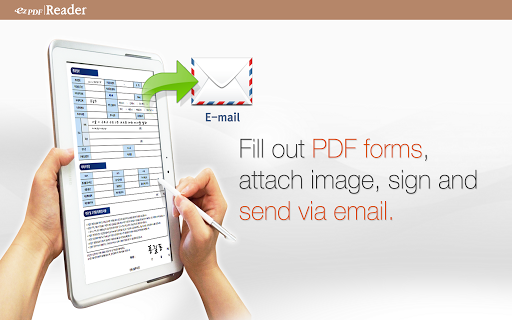
PDF Form Filler
Good for application forms, school tests, and contracts. Fill out your PDF form with ezPDF Reader. Sign with Freehand, and send via email.

Multimedia PDF Viewer - Audio, Video, and TTS (using device's built-in Text-to-Speech feature)
It also plays multimedia files embedded into PDF. Perfect solution for PDF based audio/video-enabled eBooks. (Multimedia file format must be compatible to your Android device, However, no support for Flash) Use Voice Reading feature to have documents read to you with the continuous automatic page-turning feature. (It uses TTS feature of the hardware settings)

Annotation Features on PDF
Useful tool to add text in text box and sticky notes; highlight, underline, or cross out texts; draw rectangles, ovals and freehand drawings. Add memo & append images from camera shots or galleries, change color / thickness, resize and move them around as you like. All these comments are compatible with Adobe® Acrobat®. (PC or Mac version)
Please download "ezPDF Reader Google Drive Plugin" App for integrating with Google Drive. Dropbox integration included.

More Features
-Text View with reflow function. Night / Day Mode, Able to change font size and color (text and background)
-Thumbnail image view
-Search (Options for case sensitive, whole word or part, exact word, and/or operator) and highlighted result
-Auto Fit Zoom for multi-column article or removing white margin
-Crop or Rotate page
-Scroll lock / unlock
-Able to select text in PDF, save to clipboard, web search, share with other apps, check with dictionary (Support ColorDict)
-Support hyperlinks (Go to page within the PDF, Call PDF to PDF, URL links to webpage)
-Open Standard Password-protected PDF (A DRM protected PDF file would not be opened.)
-Intuitive bookmarking & viewing bookmarks with its description and ribbon & thumbnail image
-Auto Page Turn (in secs) or Auto Scroll (up a screen full) 
-Table of Contents
-Page navigation with thumbnail scroll images
-Jump to a specific page by its Page Number
-Change reading direction - Arabic, Chinese, Japanese & Hebrew
-Undo & Redo button
-Support Trackball
-Page Turning Effect (Flip); Can be turned off
-FREE PDF Conversion PC Program (link to download)
-5-point-tap : Annotation Tool ON/OFF
-4-point-tap : Notification Bar ON/OFF
-3-point-tap : PDF view or Text Reflow view
-2-point-tap : Reduces the page to fit the width when enlarged
-1-point-tap : Toggles Menu ON/OFF

What's New
2.6.1.1
- Stablilization of Typewriter Annotation.
- Bugfix.

This app has NO advertisements

ezPDF Reader - Multimedia PDF v2.6.1.1 apk